Linea AureaDocumenta
The Solution

This is how your documentation becomes a control center.

One clear problem, four steps, one live picture — and how it stays secure while doing it.
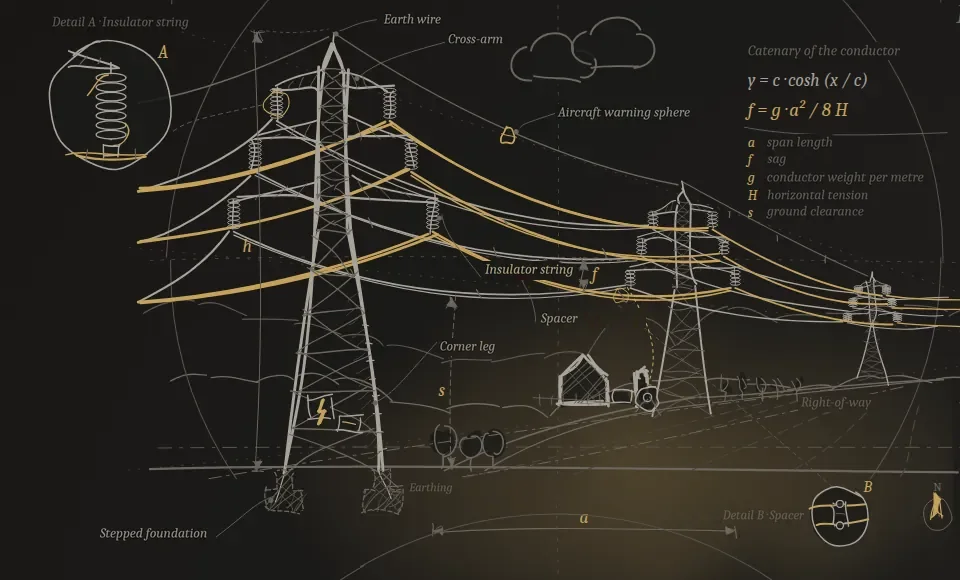
The problem that costs money

Documentation decides schedule, acceptance and liability — yet stays invisible until the very end.

Records scattered across the CDE, emails, folders No one sees the overall status Handover fails on the first attempt Risk only surfaces at the gate

See what's missing

LAD checks against your domain's documentation catalog and immediately shows every gap — by section, by trade, by gate.

Steer, don't administer

The control center turns the pile of documentation into a governable approval chain: what's blocking, what's next, who decides.

A handover that holds

Every green light has a traceable path to its record. Acceptance becomes plannable instead of a gamble.

In detailSix everyday situations comparedWithout LAD · With LAD — each with a concrete example in the Control Center.Expand
SituationWithout LADWith LAD
An inspection deadline expires
Without LADOnly surfaces at the next audit.
With LADShows up weeks ahead in the control center.
Concrete: This is exactly what the Deadlines tab in the control center shows — e.g. Central Station, protection test report due in ~90 days.
Handover to operations
Without LADFollow-up requests and delay.
With LADComplete before acceptance is due.
Concrete: This is what it looks like for the Overhead Line in the Control center — all records complete, Gate G6 · Acceptance already reached.
Looking for a record
Without LADSearching folders, emails and the CDE.
With LADOne click from the record to the object.
Concrete: The Documents tab of the document room demo shows exactly this click path — from the document via the QR resolver straight to the chain of evidence.
Overall status of the network
Without LADNo one knows it completely.
With LADVisible at a glance — by asset and gate.
Concrete: The "By Area" view in the Control center shows this for all 10 assets at once — including documentation coverage by area.
An experienced team member retires
Without LADThe knowledge leaves with them.
With LADStandards and chains of evidence stay in the system.
Concrete: More on this in the FAQ "What happens when staff change?" and in the use case "Staff turnover on the team".
New system (SAP, GIS …)
Without LADA migration and data-move project.
With LADConnected read-only, no migration.
Concrete: This is exactly what the SAP PM/EAM example on the Security & Compliance page shows — read-only, no system migration.
How it works

From your systems to the decision — in four steps.

No system migration, no data move. Linea Aurea sits above what is already running and turns it into a resilient overall status.

1

Connect

LAD docks read-only onto your systems — SAP, ELO, GIS, SharePoint, Jira and more. Nothing is replaced.

.In practice

This is how it works for the SAP PM/EAM · Equipment 10004521 source-system example on the Security & Compliance page — LAD only reads, it changes nothing in the SAP record.

2

Structure

Every document becomes a container: asset, type, version, deadline and chain of evidence belong together.

.In practice

In the Documents tab of the document room demo, every document carries its asset, version, inspection and retention deadline, and gate assignment from the outset.

3

Evaluate

Deadlines, gaps and handover readiness come together in the control center — based on the current data status, by asset, area and gate.

.In practice

The Deadlines & Gates tab shows exactly such cases with advance notice — for example the protection test report, Central Station.

4

Decide

You see in black and white what's missing and what's ready for acceptance — and act before it gets expensive.

.In practice

This is exactly what phase 4 of the Pilot Blueprint is for, "Proof of value & decision" — with a before/after comparison and a recommended action instead of gut feeling.

The control center · core of the platform

The control center: the central steering unit for your entire network.

Everything scattered across your systems comes together here — across sectors, areas and gates. Many views, one state of truth. Click through the control center.

Central steering unit — all sectors, areas and records come together here
5D Control Center · Portfolio · Electricity NetworkDEMO
10 assets · Electricity network · as of today
Substations2 assets
Documentation coverage96 %
1 deadline approachingopen: 1
Central Station: protection test report due in ~90 days (Gate G5 · Handover). The second asset is complete.Responsible: Asset Management · Last updated: 4 days ago
Overhead Line1 asset
Documentation coverage100 %
completeopen: 0
All records complete — no open items, Gate G6 · Acceptance reached.Responsible: Operations / Maintenance · Last updated: 1 month ago
Switching Stations2 assets
Documentation coverage83 %
1 record missingopen: 2
Switching Station South: declaration of conformity missing, blocking Gate G4 · Approval. Switching Station North: 1 further record open.Responsible: Grid Expansion Project Management · Last updated: today
Underground Cable1 asset
Documentation coverage78 %
under constructionopen: 2
Cable Route A9: 2 records open, currently in Gate G3 · Construction.Responsible: Grid Expansion Project Management · Last updated: 1 day ago
Offshore1 asset
Documentation coverage65 %
under constructionopen: 3
Offshore Cable Link North: 3 records open during the build-out phase, Gate G3 · Construction.Responsible: Grid Expansion Project Management · Last updated: 2 days ago
Battery Storage1 asset
Documentation coverage90 %
1 deadline approachingopen: 1
Battery Storage East: inspection deadline due in ~60 days, Gate G5 · Handover.Responsible: Asset Management · Last updated: 6 days ago
Ground-mounted PV1 asset
Documentation coverage100 %
completeopen: 0
Solar Park Heath: all records complete, Gate G6 · Acceptance reached.Responsible: Operations / Maintenance · Last updated: 2 weeks ago
Onshore Wind1 asset
Documentation coverage92 %
1 deadline approachingopen: 1
Wind Farm Ridge: aviation lighting inspection due in ~120 days, Gate G5 · Handover.Responsible: Asset Management · Last updated: 3 days ago

Role-based views — the same truth, a different view. Choose a role: the control center shows what matters to them.

"See immediately which records are missing and what's next" — the priority list for the team meeting, sorted across all areas.

!
Switching Station SouthDeclaration of conformity missing · Gate G4 · Approval
•
Switching Station North1 record open · Gate G4 · Approval
•
Central StationProtection test report — due in ~90 days · Gate G5 · Handover
•
Cable Route A92 records open · Gate G3 · Construction
•
Offshore Cable Link North3 records open — build-out phase · Gate G3 · Construction
•
Battery Storage EastInspection deadline due in ~60 days · Gate G5 · Handover
•
Wind Farm RidgeAviation lighting inspection — due in ~120 days · Gate G5 · Handover
7 open items, 10 individual records — the same facts as in and , brought together here into one list for the documentation manager.

"Spot handover risk and blocked work packages before the gate arrives" — the current status and next step for each asset.

AssetGateOpen ItemResponsible
Switching Station SouthG4 · ApprovalDeclaration of conformity missingGrid Expansion Project Management
Switching Station NorthG4 · Approval1 record openGrid Expansion Project Management
Central StationG5 · HandoverProtection test report — due in ~90 daysAsset Management
Cable Route A9G3 · Construction2 records openGrid Expansion Project Management
Offshore Cable Link NorthG3 · Construction3 records open — build-out phaseGrid Expansion Project Management
Battery Storage EastG5 · HandoverInspection deadline due in ~60 daysAsset Management
Wind Farm RidgeG5 · HandoverAviation lighting inspection — due in ~120 daysAsset Management

Table scrolls horizontally

Gate progress in detail: · Risk assessment:

"One glance: is the project ready for acceptance, where does the risk stand" — solid figures for reporting and the board.

88 %Overall documentation coverage
10Assets in portfolio
1critical risk
10open records overall
Biggest lever: Switching Station South — Declaration of conformity missing, Gate G4 · Approval.
Portfolio view for the Electricity network, as of today — comparable across all twelve sectors in the switcher above.
G3 · Construction
10/10
G4 · Approval
8/10
Stuck at 8/10: Switching Station South (declaration of conformity missing) and Switching Station North (1 record open) have not yet been approved here.
G5 · Handover
5/10
Stuck at 5/10: Central Station (protection test report, due in ~90 days), Battery Storage East (inspection deadline in ~60 days) and Wind Farm Ridge (aviation lighting, due in ~120 days) are still outstanding here.
G6 · Acceptance
3/10
The portfolio moves left to right through fixed gates. LAD shows how many assets have reached each stage — and what is blocking the next one.
Declaration of conformity missingSwitching Station South · blocking Gate G4 · ApprovalResponsible: Grid Expansion Project Management · Last updated: todayhigh
1 record openSwitching Station North · Gate G4 · ApprovalResponsible: Grid Expansion Project Management · Last updated: todaymedium
Protection test report — due in ~90 daysCentral Station · Gate G5 · HandoverResponsible: Asset Management · Last updated: 4 days agomedium
2 records openCable Route A9 · Gate G3 · ConstructionResponsible: Grid Expansion Project Management · Last updated: 1 day agomedium
3 records open — build-out phaseOffshore Cable Link North · Gate G3 · ConstructionResponsible: Grid Expansion Project Management · Last updated: 2 days agomedium
Inspection deadline due in ~60 daysBattery Storage East · Gate G5 · HandoverResponsible: Asset Management · Last updated: 6 days agomedium
Aviation lighting inspection — due in ~120 daysWind Farm Ridge · Gate G5 · HandoverResponsible: Asset Management · Last updated: 3 days agomedium
Remaining 3 assets on trackNo open risks · Gate G5–G6on track
Prioritized by impact on schedule and acceptance — not as alert noise. What tips first is listed at the top.
overdueSwitching Station SouthDeclaration of conformity missing · Gate G4 · ApprovalResponsible: Grid Expansion Project Management · Last updated: today
60 daysBattery Storage EastInspection due · Gate G5 · HandoverResponsible: Asset Management · Last updated: 6 days ago
90 daysCentral StationProtection test report due · Gate G5 · HandoverResponsible: Asset Management · Last updated: 4 days ago
120 daysWind Farm RidgeAviation lighting inspection due · Gate G5 · HandoverResponsible: Asset Management · Last updated: 3 days ago
Sorted chronologically by due date — overdue or blocked items always come first, regardless of area.

Every area against every approval gate. In place, open or not yet reached — select a row to open the area card.

in placeopenblockednot yet reached

How the documentation position develops. Coverage over the last twelve weeks, open records per week and the forecast to completeness.

Traceable change log. Every change with time, responsible role and affected asset — from the same data as every other view.

The control center sits above these systems — it replaces none of them. Every object stays in its source; LAD only links metadata, deadlines and chains of evidence on top.

SAPSAP PM / EAM

Asset master data, equipment, maintenance orders.

synced2,418 objects
ELOELO DMS

Document storage, version states, retention deadlines.

synced14,207 documents
SPSharePoint

Project & construction files, approvals, storage.

synced6 project spaces
JRJira

Tasks, defects and actions per asset.

synced312 issues
CDECDE / BIM Platform

Project folders, plans and models from the construction phase.

synced3 construction projects
GISQGIS / ArcGIS

Network topology, routes, asset geometry.

syncedNetwork map linked
CFConfluence

Operating instructions, standards, knowledge.

synced87 pages
+More systems

Practically any system a network operator runs — via connector, interface or file import.

Specialist applications · sector systems …
All seven connected systems in sync, read-only at operational boundaries — the same Source Systems view as in the document room, here directly in the control center's portfolio view.

All twelve sectors compared directly (water and wastewater shown separately). The same figures as in the Executive Management view under "By Role" — here side by side instead of one after another. Click a row to switch to that sector.

Sector
Electricity1088 %110
Gas892 %15
Water895 %03
Wastewater893 %14
District Heating895 %03
Rail891 %15
Airports893 %14
Roads & Tunnels895 %03
Hydrogen893 %14
Data Centers895 %03
Food Production893 %14
Telecom895 %03
Nuclear895 %03

Table scrolls horizontally

Highlighted sector: current selection in the switcher above. Figures calculated from and per sector.

The same open items, grouped by team. Who is responsible for what — without filtering the list yourself.

Grid Expansion Project Management4
!
Switching Station SouthDeclaration of conformity missing · Gate G4 · Approval
•
Switching Station North1 record open · Gate G4 · Approval
•
Cable Route A92 records open · Gate G3 · Construction
•
Offshore Cable Link North3 records open — build-out phase · Gate G3 · Construction
Asset Management3
•
Central StationProtection test report — due in ~90 days · Gate G5 · Handover
•
Battery Storage EastInspection deadline due in ~60 days · Gate G5 · Handover
•
Wind Farm RidgeAviation lighting inspection — due in ~120 days · Gate G5 · Handover
Operations / Maintenance0

No open items.

The same open items as in and , here grouped by responsibility.
Request 30-minute Fit Check
The document room

This is how your team works in the system — four views, one truth.

Documents, assets, deadlines and the connected source systems — every view shows the same status, just sliced differently. Click through it.

DemoOpen the document roomDocuments, assets, deadlines & gates, source systems — four views to click through, synthetic.Expand
LAD · Sample Network Operator LtdElectricity Network Search: asset, type, deadline …
2,418 objects · 14,207 documents · as of today
All areasSubstationOverhead LineDeadline < 90 daysOpen
DocumentAssetDeadlineStatus
In-service Inspection Report
Substation North · Bay 307/2027valid
Asset Profile
Substation North · Bay 3—valid
Protection Test Report
Central Station02/2027deadline approaching
Declaration of Conformity
Switching Station Southopenmissing
As-Built Documentation
Route East—valid
Joint Test (Underground Cable)
Cable Route A9openmissing
Thermography Report
Substation West12/2027valid
Earthing Measurement
Cable Route A905/2027on track
Substation NorthSubstation · Bay 1–4
Records13 / 14
1 deadline approachingGate G5 · Handover
Substation WestSubstation · Bay 1–6
Records14 / 14
completeGate G6 · Acceptance
Central StationSubstation
Records10 / 11
1 deadline approachingGate G5 · Handover
Switching Station SouthSwitching Station
Records11 / 12
1 missingGate G4 · Approval
Route EastOverhead Line · Pole 1–42
Records20 / 20
completeGate G6 · Acceptance
Cable Route A9Underground Cable · Joint 1–6
Records7 / 9
2 openGate G3 · Construction
Offshore Cable Link NorthOffshore · Subsea Cable
Records13 / 20
under constructionGate G3 · Construction
Battery Storage EastBattery Storage
Records9 / 10
1 deadline approachingGate G5 · Handover
2overdue / missing
2deadline < 90 days
36on track
DeadlineDocumentAssetRemainingGateStatus
open
Declaration of Conformity
Switching Station South—G4missing
open
Joint Test (Underground Cable)
Cable Route A9—G3missing
02/2027
Protection Test Report
Central Station~90 daysG5deadline approaching
05/2027
Earthing Measurement
Cable Route A9~180 daysG3on track
07/2027
In-service Inspection Report
Substation North · Bay 3~240 daysG5valid
12/2027
Recurring Inspection
Substation West~13 monthsG6on track
12/2027
Thermography Report
Substation West~13 monthsG6valid
LAD calculates deadlines from inspection & retention rules per asset type — not as a reminder, but as a rule. A record that's missing shows up here before the gate demands it.

LAD sits above your systems — it replaces none of them. Every object stays in its source; LAD links metadata, deadlines and chains of evidence on top. Read-only at operational boundaries.

SAPSAP PM / EAM

Asset master data, equipment, maintenance orders.

synced2,418 objects
ELOELO DMS

Document storage, version states, retention deadlines.

synced14,207 documents
GISQGIS / ArcGIS

Network topology, routes, asset geometry.

syncedNetwork map linked
CDECDE / BIM Platform

Project folders, plans and models from the construction phase.

synced3 construction projects
SPSharePoint

Project & construction files, approvals, storage.

synced6 project spaces
JRJira

Tasks, defects and actions per asset.

synced312 issues
CFConfluence

Operating instructions, standards, knowledge.

synced87 pages
+More systems

Practically any system a network operator runs — via connector, interface or file import.

Specialist applications · sector systems …

Concrete: this is what it looks like across seven source systems. Seven source systems, the same rule — LAD only reads what is marked as approved or linked. Architecture and all seven examples in detail: System Connections.

Example folder structure · synthetic
Grid Expansion Project 2026›03_Execution Planning
Piping_Plan_Rev-A.dwgWIPnot read
Piping_Plan_Rev-B.dwgSharednot read
Piping_Plan_Rev-C.pdfPublished→ read by LAD
Piping_Plan_Rev-A_old.dwgArchivednot read
LAD only reads published states (Published) — drafts (WIP), shared work in progress (Shared) and archived revisions remain untouched. Status model based on ISO 19650.
Grid Expansion Project 2026›Approvals
Protection-Test-Report_Substation-North_Draft.docxDraftnot read
Protection-Test-Report_Substation-North.pdfApproved→ read by LAD
Protection-Test-Report_Substation-North_old.pdfArchivednot read
The same rule applies regardless of the source system: only what is marked as approved is read — not the entire project library.
Network Planning Project 2026›Map Section North
KT-2288 · Overhead Line Section 4LINEnot linked
KT-2291 · Underground Cable Route A9LINE→ read by LAD
Pole 42 · Route EastPOINTnot linked
Substation North · Substation AreaAREAnot linked
The geometry stays in the GIS — LAD only links the object to its chain of evidence. From the asset object in the control center, the link jumps back to the map section, not the other way around.
Asset Master SAP PM/EAM›Equipment
10004512 · Overhead Line Route EastIn Operationnot read
10004521 · Switching Station SouthIn Operation→ read by LAD
10004530 · Substation WestIn Operationnot read
LAD reads the equipment record read-only and links it to the asset's chain of evidence — the open maintenance order (45231) remains as a reference but does not replace an approval.
Assets›Substation North›Bay 3
Inspection-Report_2023.pdfArchivednot read
Inspection-Report_2024.pdfApproved→ read by LAD
Inspection-Report_2024_Draft.pdfDraftnot read
The retention period (10 years) is taken directly from the ELO filing rule, not reinvented — the same version appears in the control center under Gate G5 · Handover.
Project NETWORK›Defects & Actions
NETZ-4455 · Defect · Overhead Line Route EastDonenot linked
NETZ-4471 · Defect · Earthing measurement overdueIn Progress→ read by LAD
NETZ-4488 · Defect · Switching Station NorthOpennot linked
LAD picks up the open Jira issue as a reference to the Cable Route A9 asset — the status in the control center ("open · Gate G3") stays tied to the actual record, not to the Jira status alone.
Space Electricity Network Operations›Operating Instructions
BA-009 · Switching station approval processPublishednot linked
BA-014 · Medium-voltage protection test (v6)Published→ read by LAD
BA-014 · Medium-voltage protection test (Draft v7)Draftnot linked
Operating instructions apply network-wide — LAD links the published version (v6) to all affected assets, not just one.
✗ Without LAD

Searching folders, emails and the CDE. Deadlines only surface at the gate. No one knows the overall status.

✓ With LAD

One click — document, metadata, deadline and chain of evidence belong together. The QR jumps from paper back to the digital object.

Concrete: This is exactly what you see above in the Documents tab — the in-service inspection report for Substation North · Bay 3 carries version, inspection deadline, retention period, gate and QR resolver in a single container.

Hands-on — the standard reaches all the way into the document

Ready-made templates from the standard — view as PDF samples, with QR.

Three templates from network operations (example "Sample Network Operator"): full metadata and control block, standard references, and a QR·DMS resolver that jumps from the printed page back to the digital document. This consistency — every template following the same structure — is, in our experience, still rare. Synthetic. The editable Word/Excel originals are part of the pilot. Note: The English samples are adapted to the regulatory framework in Great Britain (for example Electricity at Work Regulations, IGEM, BS EN); companies, places and projects are fictitious. Structure and logic are identical across languages.

In detailThe template samples as PDFConcept study, inspection record, risk matrix — with control block and QR link back.Expand
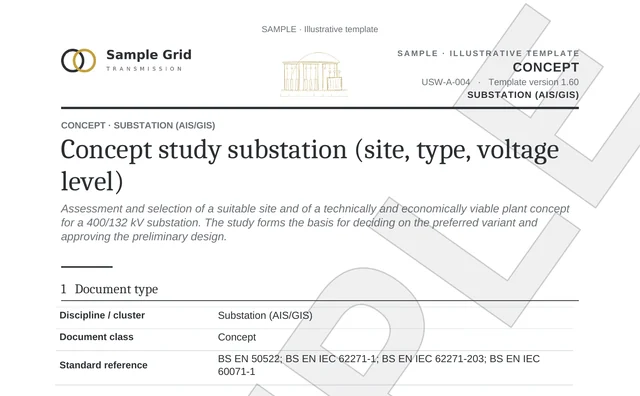
Concept Study · Substation

Word report with identity and control block, standard references and QR link-back to the DMS.

PDF sample · original DOCX · with QR · English

Demo example: The same assets — Substation North and Substation West — appear in the Assets tab of the document room demo with their calculated documentation coverage.

↓ View sample (PDF)
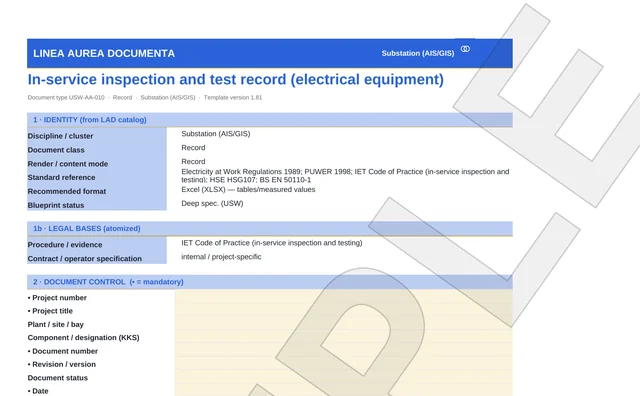
In-service Inspection Record

Recurring inspection of equipment — structured Excel with QR·DMS resolver.

PDF sample · original XLSX · with QR · English

Demo example: This exact document appears as an example in the Documents tab of the document room demo (Substation North · Bay 3, valid until 07/2027).

↓ View sample (PDF)
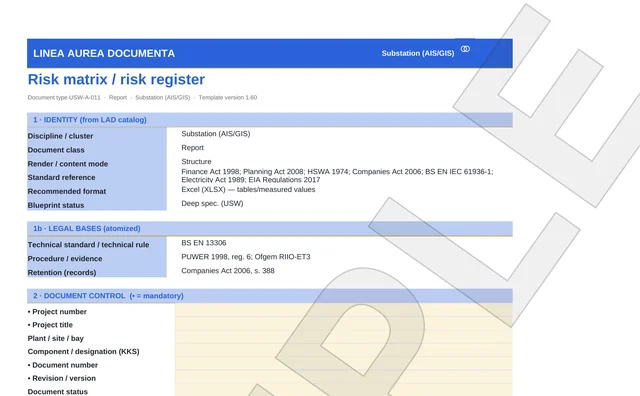
Risk Matrix & Register

Capture and assess risks in a structured way — with metadata block and QR·DMS resolver.

PDF sample · original XLSX · with QR · English

Demo example: The Risk Status view in the control center shows the same principle of structured risk capture.

↓ View sample (PDF)
Security & Operations

Built for critical infrastructure — not against it.

LAD sits read-only above your systems, runs wherever you want it to, and never interferes with operations.

Data flow, boundaries and the full IT checklist are collected on the page View Security & Compliance →

See it on your own network.

30 minutes, no system access: using your use case we check whether a pilot area can be clearly scoped — no slide deck.

  1. Send a requestBriefly, your topic and your sector.
  2. 30-minute conversationOn your use case, no system access.
  3. A clear answerWhether a pilot area can be clearly scoped.
Request 30-minute Fit Check